Classroom Creators Online: Free Name Tags, Labels & Certificates in Minutes
Free browser tool to print classroom name tags, labels, and certificates in minutes. No login, no setup, no Sunday-night spreadsheet wrestling.

We just launched our free Editable Name Tags Generator, a brand-new free tool on The Resource Registry that lets you create beautiful, print-ready name tags and certificates for your students in just a few clicks. No downloads. No accounts. No subscriptions. Just open, customize, and print.
Let's walk through everything it can do.
If a classroom prep tool takes more time than the prep itself, it's not a tool. It's a hobby.
What Is Classroom Creators Online?
Classroom Creators Online is a free, browser-based tool designed to help teachers, parents, tutors, and anyone working with kids quickly create polished classroom materials. Right now, it includes two main features:
Name Tags — customizable desk name plates with avatars, icons, or text-only styles
Certificates — elegant achievement certificates with multiple layouts and color schemes
Everything runs right in your browser. There's nothing to install, and your creations can be printed directly or saved as a PDF.
Name Tags That Actually Look Good
We all know the struggle. You want your classroom to feel welcoming on the first day, and personalized name tags are one of those small touches that make a big difference. But making them? That usually means fiddling with table cells in a word processor or searching for yet another template that doesn't quite fit.
Classroom Creators changes that. Here's how it works:
Add Your Students
Type in student names one at a time, or use the Bulk option to paste in an entire class list at once. The tool currently supports up to a full class roster, so whether you have 8 students or 30, you're covered.
Choose a Label Style
Pick from three visual styles for your name tags:
Avatar — Each student gets an adorable cartoon face. You can click on any avatar to customize how it looks, so every student's name tag feels personal.
Icon — A fun emoji icon appears next to each name. Great if you want something visual but more minimal.
None — Clean, text-only name tags. Perfect for older students or when you just need something simple and professional.
Assign Classroom Jobs
Here's a feature teachers will love: each student entry has a Job dropdown. Assign classroom roles right on the name tag — line leader, paper passer, pencil sharpener, you name it. It's a great way to combine your name display with your classroom job chart, saving you wall space and laminating effort.
See It All in Real Time
The right side of the screen shows a live preview of your name tags as you build them. The default "Rainbow Brights" theme gives every student a different colorful border, making it easy to tell tags apart and adding a cheerful pop of color to desks and cubbies.
Print or Save as PDF
When everything looks the way you want it, hit Print to send your name tags straight to the printer, or click PDF to download a file you can save, share with a co-teacher, or print later.
Certificates Students Will Actually Want to Keep
The second tab in Classroom Creators is all about Certificates — and they look surprisingly polished for something you can create in under a minute.
Pick a Layout
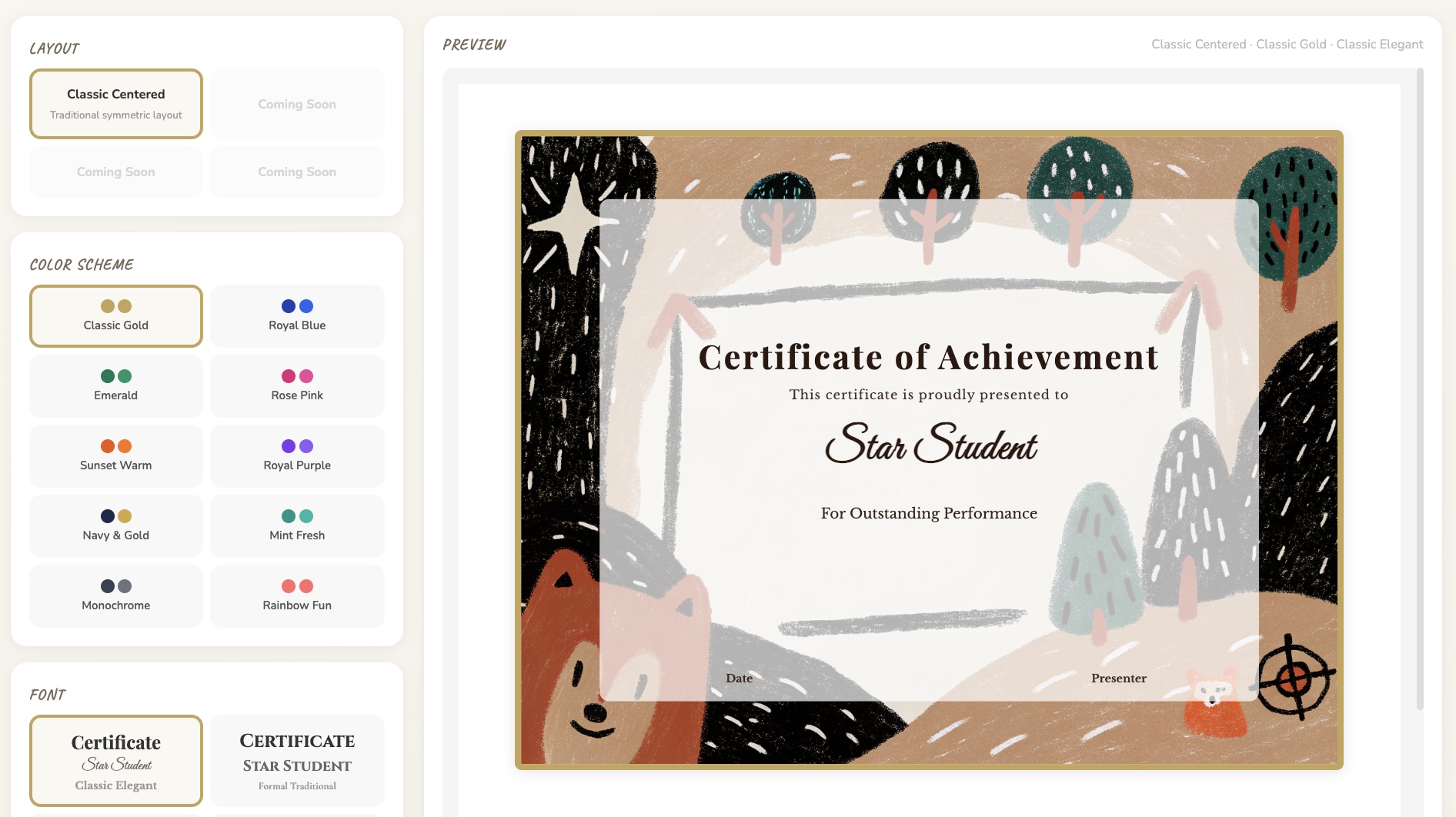
The tool launches with a Classic Centered layout — a traditional, symmetric certificate design that works for just about any occasion. More layouts are on the way (you'll see "Coming Soon" placeholders), so this is just the beginning.
Choose Your Color Scheme
This is where things get fun. There are ten color schemes to choose from:
Classic Gold, Royal Blue, Emerald, Rose Pink, Sunset Warm, Royal Purple, Navy & Gold, Mint Fresh, Monochrome, and Rainbow Fun.
Whether you want something elegant and formal or bright and playful, there's a palette that fits. The preview updates instantly as you click through options, so you can experiment without committing.
Customize the Details
The certificate preview includes fields for the student's name, the reason for the award (like "Outstanding Performance"), a date line, and a presenter signature line. It's designed to cover the most common use cases — end-of-year awards, student-of-the-week recognition, reading challenges, behavior milestones, and more.
Font Options
There's also a Font section that lets you adjust the typography to match the vibe you're going for. Pair a playful font with the Rainbow Fun color scheme for younger students, or keep things classic with a traditional serif and the Gold palette for a more formal ceremony.
Who Is This For?
While we built Classroom Creators with elementary teachers in mind, it's really for anyone who works with kids:
Classroom teachers (PreK–5) — First-day-of-school name tags, desk plates, and monthly award certificates
Special education teachers — Personalized materials that can be quickly regenerated as rosters or groupings change
Tutors and homeschool parents — Professional-looking certificates to celebrate milestones and keep kids motivated
School administrators — Quick, consistent certificates for school-wide recognition programs
After-school program leaders — Name tags for new groups and certificates for program completions
Why We Made It Free
At The Resource Registry, we believe core classroom tools shouldn't come with a price tag. Teachers already spend too much of their own money on supplies and materials. A tool that helps you make name tags and certificates — something nearly every educator needs — should just be available.
That's why Classroom Creators Online is completely free. No signup. No trial period. No watermarks. Just a tool that works when you need it.
Tips for Getting the Most Out of Classroom Creators
Here are a few ideas to help you put the tool to work right away:
For back-to-school season: Create desk name plates with the Avatar style a few days before school starts. Print them on cardstock for durability, fold them into tent cards, and you've got a welcoming classroom ready to go.
For classroom management: Use the Job assignment feature to rotate roles weekly. Print a fresh set of name tags each Monday with updated jobs — it takes less than five minutes.
For recognition and motivation: Keep a few blank certificates saved as PDFs and fill them in throughout the year. Whether it's a reading goal, a kindness award, or a math milestone, having a polished certificate ready to go makes recognition feel special.
For parent communication: Send home a certificate with students after a big accomplishment. Parents love having something tangible to put on the fridge, and it reinforces positive behavior at home too.
What's Coming Next
Classroom Creators Online is just getting started. We're actively working on new certificate layouts, additional name tag themes, and more customization options — but that's not all. We also have plans to add entirely new classroom tools to the Creators suite, so name tags and certificates are just the beginning. If there's a tool you wish existed — something you find yourself making from scratch every year — we'd love to hear about it.